A Simple Arch Review
I once thought that Debian, with its rock solid stability and simple package management, was the answer to my distro-hopping madness, and that no other distro could fit my needs as well. But Arch Linux has managed to surprise me, satisfying my needs in ways Debian never could. (Did that sound weird and strangely sexual or what?)
The Arch Way, the five governing principles behind the development of Arch Linux, dictates that Arch should be: simple, have code-correctness over convenience, open, user-centric, and free. Elaborating on the principles would be too time intensive for this review, but the general gist of The Arch Way is the age-old engineering adage, KISS (Keep it Simple Stupid). And Arch is simple. Most Linux distributions that claim to be simple, like Ubuntu or Mandriva, are merely simple to use for new Linux users, but Arch is a minimal, streamlined, and elegantly simple distro. Like Slackware, Arch's base installation is quite Spartan, including only the kernel and the bare minimum packages needed to create a stable OS, requiring the user to do all the rest of the configuring and installation of non-essential packages.

Happily enough, unlike Slackware, Arch uses binary packages compiled for i686 so that users don't have to compile their programs from source (not a very difficult process usually, but quite time consuming). Because Arch's packages are optimized and compiled for newer i686 CPUs, users can expect a noticeable performance increase over distributions, like Debian, that use i386 packages. However, this also means that Arch will require a slightly newer CPU, a Pentium 3 or newer, whereas Debian can run on any 32-bit Intel-based processor. Arch also offers a 64-bit version, in addition to the 32-bit i686 version, if you want to be able to add more then 4 gigs of RAM to your system.
Arch's package manager, called "pacman," is reminiscent of Debian's "apt-get" and just as easy to use. Pacman can handle the installation, removal, and upgrading of programs, and also resolves dependencies with a single simple command. If I want to install Banshee music player, all I have to do is open a terminal, become root, and type "pacman -S banshee." Pacman also allows for Arch's rolling release system, a system based upon on incremental upgrades. Unlike so many other Linux distributions that make a big fuss about new releases, Arch's release version is essentially meaningless; a release ISO in Arch is simply a snapshot of the core repository with a fairly simple installation script. In order to upgrade my system to the newest kernel and software packages, I merely have to type "pacman -Syu" to fetch the newer packages from the repositories, so that even if I had used the three year old Wombat release, after an update my system would still be as up-to-date as if I had used the new Overlord release.
Arch is not a distribution for Linux noobs or people that don't want to have spend a lot of time configuring the system. Whereas popular distros like Ubuntu or PCLinux have flashy GUI installation menus, Arch's installation is all text based, and requires user's to configure and set just about everything, including /etc/rc.conf, /etc/modprobe.conf, networking, and hard drive partitioning and mounting. If you already have some moderate Linux experience and want to learn more about Linux, then Arch can certainly facilitate in your learning process.
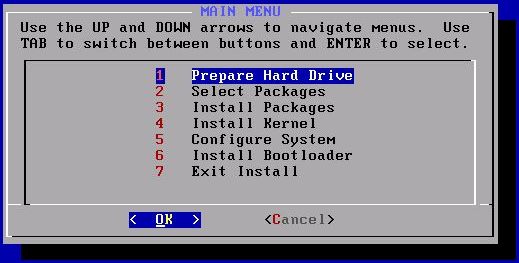
The initial boot of a new Arch system will present the user with only a shell, where the user can then add and configure new programs with the help of pacman. Because Arch is built from the ground up by the user, it is optimized for the user's needs; the user can select whatever programs they want and load only the modules they need. The end result, in addition to being tailored specifically to the user's requirements, is a system that is slim and much faster then Ubuntu or PCLinux. (My biggest problem with Ubuntu was how would it always install things I didn't need, like bluetooth support, CUPS, and wireless drivers, and then proceed to load a dozen different daemons and modules that were entirely unnecessary, thus slowing the system down.)
During my installation I did have a slight problem with cfdisk, the command line program used by Arch for partitioning the hard drive. Cfdisk threw an error initially, something about my NTFS partition being funky (sorry, I can't remember exactly what it was), so I booted an Ubuntu Live CD to use gparted to partition my driver instead. However, when I installed Arch on my old Thinkpad T31 cfdisk worked without a problem.
While I did find the installation process a little daunting, the extensive documentation that Arch's online wiki offers was extremely helpful. Arch's wiki was nothing sort of astonishing, containing in-depth information on just about everything new and experienced Archers could possibly need. New users to Arch, will most definitely want to check out Arch's beginner's guide as it describes the installation process step-by-step, and even goes in-depth into what exactly each step actually does. With the Arch wiki open on my other machine, installing Arch on my laptop was surprisingly easy.
I like Arch because its lightweight, streamlined, fast, and easy to use, whereas Debian always tended to feel a little bit bloaty. In the end, I found I was perfectly happy to sacrifice a little of Debian's legendary stability for Arch's speed. But like all Linux distributions, Arch isn't the right choice for everyone. I won't tell you if you should be using Arch, but if you like what you've heard and don't mind going a little deeper into Linux and seeing how it works, then perhaps Arch is the one for you.
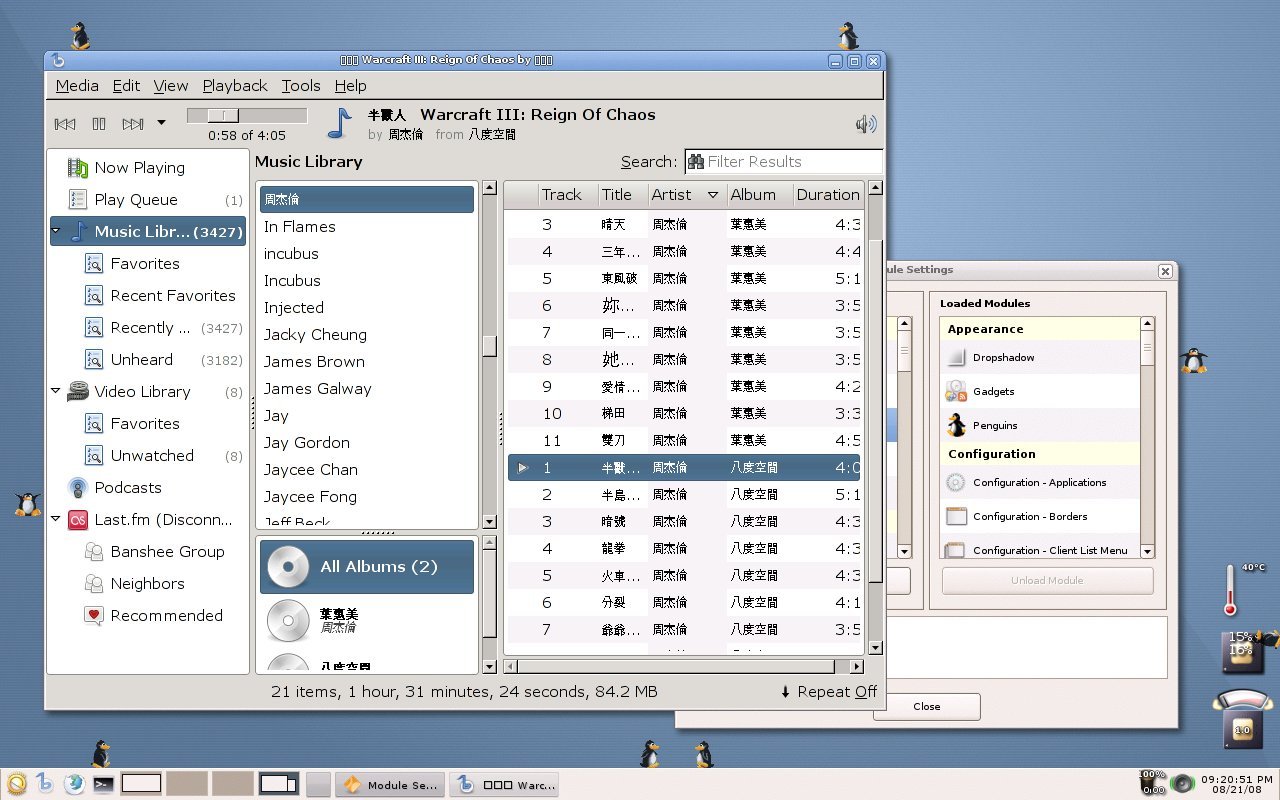
(It doesn't have much to do with my review, but here is a screenshot of my Arch desktop, running Enlightenment 17 with the "pengiuns" module enabled.)
Categories
- Computers (27)
- Daily Log (18)
- Gadgets (5)
- Linux (34)
- Literature (20)
- Out Doors (23)
- Polyphasic Sleep (6)
- Programming (31)
- Random Stuff (47)
- School (43)
- Site News (26)
- Software (16)
- Stocks (6)
- Uncategorized (3)
- work (4)
Archives
- February 2016 (1)
- August 2014 (3)
- October 2013 (1)
- June 2013 (1)
- May 2013 (4)
- May 2012 (1)
- March 2012 (3)
- August 2011 (1)
- June 2011 (1)
- January 2011 (2)
- December 2010 (2)
- October 2010 (1)
- September 2010 (2)
- May 2010 (2)
- April 2010 (3)
- January 2010 (4)
- December 2009 (1)
- November 2009 (4)
- October 2009 (2)
- September 2009 (5)
- August 2009 (6)
- June 2009 (1)
- May 2009 (5)
- April 2009 (4)
- March 2009 (9)
- February 2009 (7)
- January 2009 (6)
- December 2008 (6)
- November 2008 (3)
- October 2008 (7)
- September 2008 (6)
- August 2008 (11)
- July 2008 (25)
- June 2008 (12)
- May 2008 (7)
- April 2008 (12)
- March 2008 (5)
- February 2008 (5)
- January 2008 (7)
- December 2007 (2)
- November 2007 (6)
- October 2007 (4)
- August 2007 (3)
- July 2007 (6)
- June 2007 (2)
- May 2007 (10)
- April 2007 (7)
Comments
- on Micro-blogging
- on Micro-blogging
- on Reasons for Buying a Refurbished Thinkpad
- on Miyata Alumicross
- on Miyata Alumicross


September 10th, 2008 - 01:21
I’m a new Arch user as well… for many of the same reasons. I’ve used Kubuntu, Mepis, PCLinuxOS, but was irked by all the bloat, as well as the need to wait for the next “Intrepid Ibex” or whatever. I looked for a trim distro that had up to date KDE 4.1 and rolling release.
I would warn off anyone who is afraid of command line, or who hasn’t done a few Linux installations: this install is not for the faint of heart. You will not do this installation without a considerable amount of reading, learning, and a hiccup or two along the way. If you do not have a second machine available to browse the beginner’s guide during the installation, BE SURE to print it out! It is 45 to 60 pages, depending on how you set your margins, text size, etc. Yes you need it!
I’m quite pleased with the results. After a week or so of messing around, I’ve created a very attractive and functional desktop, with access to cutting edge versions of nearly all the applications I have been accustomed to using: OpenOffice, Gimp, Blender, Firefox, Flashplayer 10 beta, Dolphin file manager, Kmail, etc.
Shaman is a capable replacement for Synaptic, although I despise the name. In addition to pacman there is yaourt, a command line tool which also gives access to Arch Linux’s AUR (Arch User Repository, I think), providing a somewhat automated package building process for a wider range of packages than are available through the normal arch repositories. This is where I had to go for Bibletime and Sword packages.
Nice job, Arch Linux!
October 14th, 2008 - 11:58
Just to let people know, with new releases of the ISO, the beginners guide is on the image, under /arch. You can read it from there instead of having another machine or printing it out.
July 11th, 2013 - 09:56
thanks, very useful information
i want to try Arch… but it’s a little intimidating. Your comment helps
October 14th, 2008 - 16:11
Daenyth,
thats good to hear! It was kind of a bother to have to keep switching back and forth between my old desktop and my laptop.
October 19th, 2008 - 14:33
Just a quick note: Slackware also uses binary packages.
Arch is great because it’s easy. It makes it easy for the user to manage and control their system.
October 25th, 2008 - 18:30
I had some issues installing Overlord, but thanks to a friend, my system is now up and running, and I’m thoroughly enjoying it. For some reason, I found editting text files to be an alluring feature of Archlinux. Pacman sealed the deal.
March 2nd, 2010 - 15:54
Most people try Arch because they think they’re being clever. All this stuff about Arch being difficult to install is just rubbish, it’s time consuming, not difficult. And after all that setting up you’ve got a system that’s no better than Ubuntu that installs in less than half an hour. I actually found Ubuntu 9.04 to boot and run quicker than Arch + Xfce4.
One other thing, about the Arch forums…it’s a boring place….lots of people slapping themselves on the back and thinking that they’re clever because they’re using a system that needs constant repairing thanks to ‘pacman -Syu’.
Arch is for people with more time than sense.
Arch fanboys are worse than mac fanboys. Not only do they think that everything else is wrong and bad, but they try to convert everyone to their cause.
March 2nd, 2010 - 17:01
@colb
You’ll notice that I never said installing Arch was particularly hard, in fact, I said it was “surprisingly easy.”
And yes, Arch does tend to require more to keep it in a good running state, when compared against other Linux distributions.
I’ve never seen Arch users trying avidly to convert others to Arch, so I’m not quite sure what you’re talking about here. Maybe I just don’t frequent the same places as you.
March 3rd, 2010 - 03:20
@chi
Unfortunately, I see these Arch Youths everywhere. Take a look here on how bad Arch fanboyism has gotten recently.
http://ubuntuforums.org/showthread.php?s=18aa50b21fb55466463826305e3b876b&t=1255229
http://linsux.org/forum/index.php?/topic/5924-arch-arch-arch-arch-arch/page__s__27ef3c5f8afd892926e7a7769e05d6df
Zenwalk irc is also wrecked by arch youths. Try take a look at their forum about the Arch complaints. They are everywhere even Fedora forum, Gentoo, etc. trying to convert everyone to their subpar distro.
April 16th, 2010 - 07:07
colb, you gotta be kidding. what is that last link, secondary literature supporting your “archs youth everywhere” claim? a topic in the category flame fest (“In addition, this board will be for flaming other sites and people”), full of users bitching about arch being “bloated”, penisfighting about who is using linux for the longest time, linux sucking in general, canada the same, blah blah blah.
all trolling, no substance.
April 16th, 2010 - 08:40
I think we should all try to calm down a bit…
I checked out your links colb, and they do seem a bit insubstantial in supporting your claim, since they don’t actually contain any Arch fanboyism, just un-cited references.
February 15th, 2012 - 16:11
Also tried arch.
First on a virtual machine, but couldn\’t get x working. My fault, I just didn\’t read the beginners guide well enough, also I only had one evening to spend.
During the weekend I thought I needed to give it another try.
This time I followed the beginners guid in detail. And yes, got my base system with mirrors enabeled. The guide says at a certain point to do an upgrade of the system. So I did. Only after this upgrade I was unable to use pacman again; it didn\’t find any network connection, pacman simply didn\’t work anymore after I suppose an upgrade of itself. This really did it for me. I really tried hard to follow everything in detail. It is not a question of difficulty or knowledge in my opnion, you can\’t know this code to repair so you are dependent of doc. I simply don\’t have the time to check everything out and read and look on google and dwell around forums etc. I like the concept of a rolling release though, but at this stage Arch is NOT productive. For those who like performance, I loved slackware for this, but there is also LUbuntu especially for low class hardware. I am not especially a fan of ubuntu but at least it works out of box in a minimum of time. I am not against system administration since it is fun to get the most out of your PC …if you have the time as a sort of hobby, but most of the time I want to run programs as a user and I want to forget about the underlying OS.
I ll come again to check out arch in a year or so to see if there is any progress.
October 18th, 2012 - 16:54
(This seems like an old thread but I will add my two cents anyway)
With some linux experience, it is not difficult to install Arch (as long as you follow the instructions in the Beginners’ Guide). It is also not very labor intensive to install (i.e., doesn’t take that long to get Arch up and running — especially when you consider that you are building the system from the ground up, installing only the apps that you need or desire).
It is a fantastic system and it is very fun to set up, update and use. The rolling-update nature of the system is thrilling — even magical (you are always on the bleeding-edge without the fear of breaking your system — like in Debian Testing).
User beware — before running “pacman -Syu”, make sure you have referred to the archlinux website to see if you need to make changes (manually) to the system. Otherwise, sooner or later you will break the system.
No other Linux distro is comparable — especially not Ubuntu. It has the spirit of gentoo but putting together a system is not as laborious or as time consuming.
The only negative, and some of the comments above alluded to this, is that SOME arch people have a condescending attitude when answering pleas for help — and a few even refuse to offer any advice. These people should stay in their egoistic cacoons. They certainly don’t add anything (at least anything positive) to the arch experience.
Despite this, I enthusiastically recommend motivated Linux users to try arch out.
April 22nd, 2013 - 16:04
My opinion is that computer savvy person who can read can install Arch.
Some may have to read the wiki a lot, others not so much.
If you don\’t enjoy arch, don\’t run it.
January 12th, 2015 - 20:21
A good read. Thanks, recently Debian testing has been growing on me.